Invoice Scanner — AI Receipt & VAT Tracker
for EU & UK Business

Snap a photo of an invoice or receipt, or import a PDF — get verified VAT calculations, multi-company accounting, and ready-to-use bookkeeping exports in one tap.

Android 8.0+ 27 EU + UK Tax Profiles Privacy-First
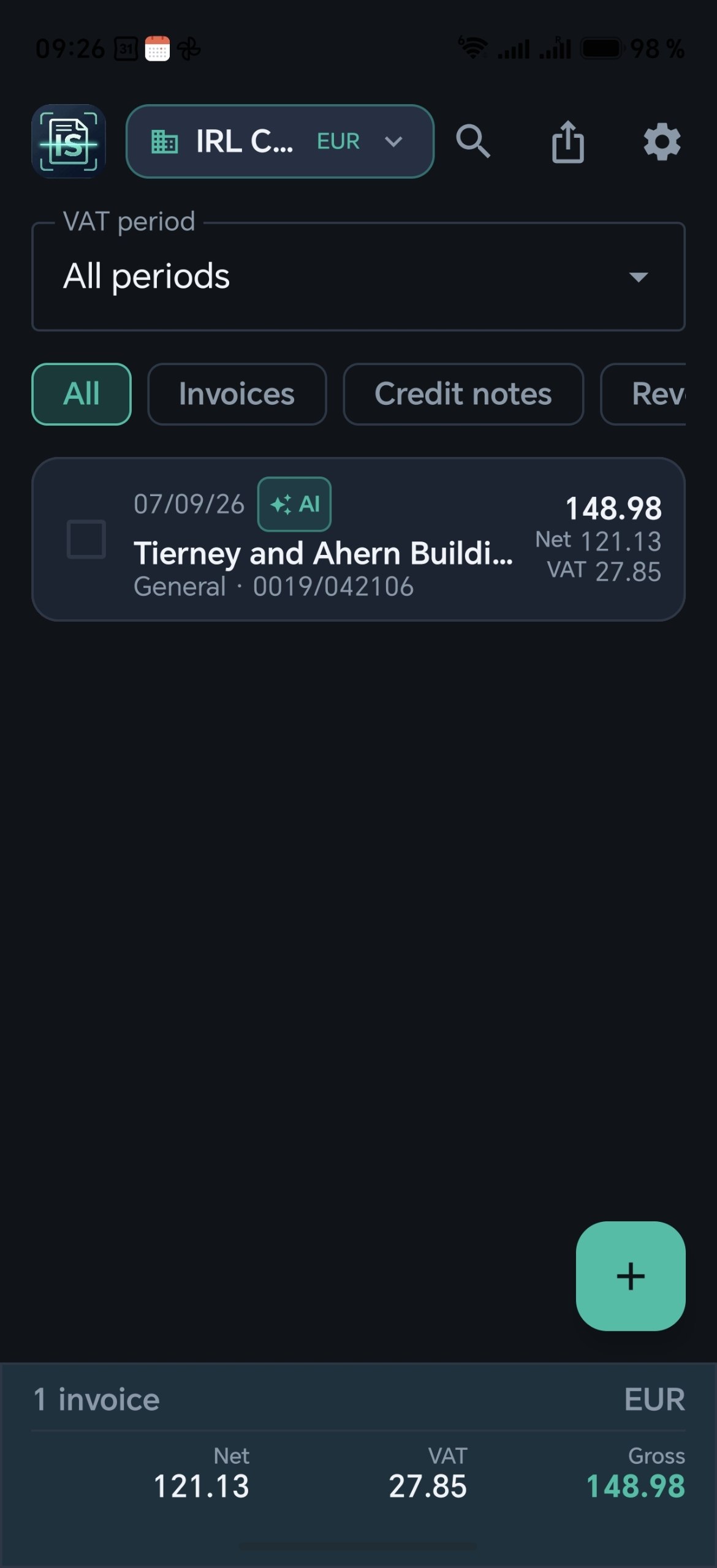
Invoice Scanner — invoice list with VAT breakdown

Key Features

Everything a small business or freelancer needs to track invoices and VAT — right from your phone.

Dual OCR Engine: On-Device + Cloud AI

Phone OCR (Google ML Kit, 100% offline) for instant recognition. One tap on “Improve Recognition with AI” sends the image to Google Gemini or Anthropic Claude for precision extraction.

28 Tax Profiles: 27 EU + UK

Standard, Reduced, Super-Reduced, Zero, Exempt rates plus Reverse Charge — all 27 EU member states and the United Kingdom covered out of the box.

Multi-Company & 22 Languages

Manage up to 10 companies with independent profiles. Separate UI language from Report/Export language — 22 European languages supported.

Accountant Pack Export in 1 Tap

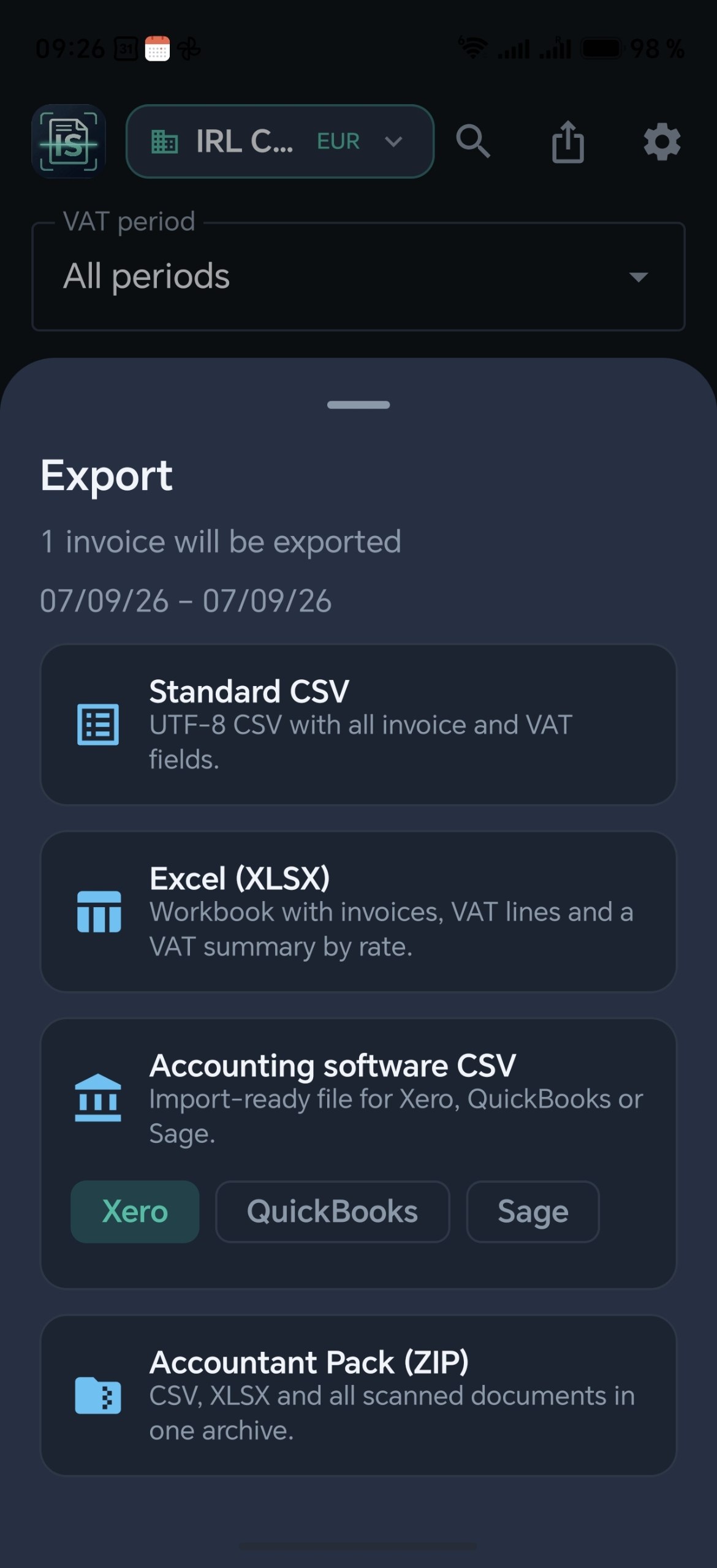
XLSX workbook (Invoice Register, VAT Summary, Category Breakdown, Suppliers), Standard CSV, templates for Xero, QuickBooks & Sage, or a full Accountant ZIP Pack with original photos/PDFs.

Smart Camera, PDF Import & Duplicate Control

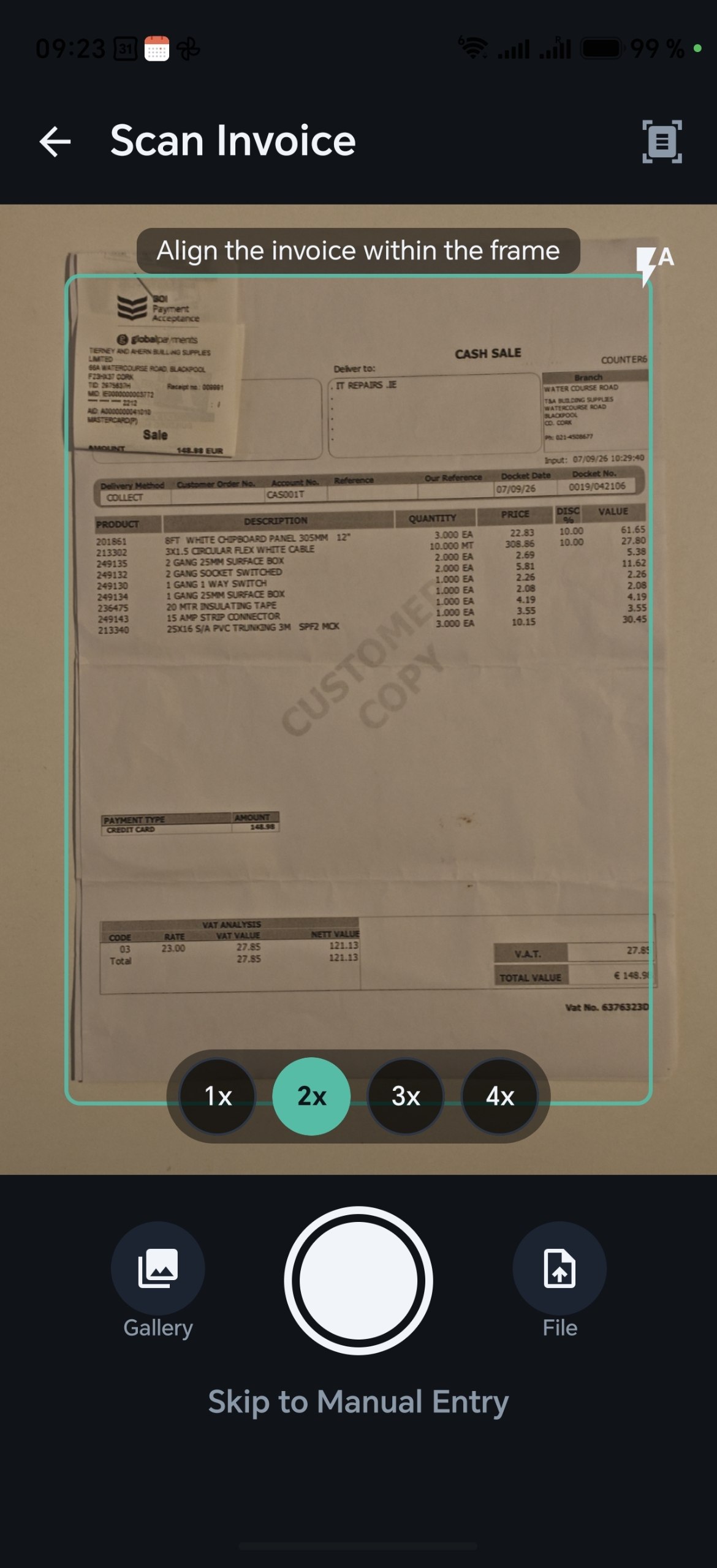
Camera zoom 1x–4x, PDF import via Storage Access Framework, and automatic duplicate detection by invoice number, supplier, date and amount.

Privacy-First Local Storage + Encrypted Backup

All data stays on your device (Room SQLite, Android protected storage). Encrypted Backup & Restore lets you transfer data between devices securely.

How It Works

From photo to bookkeeping export in five simple steps.

1

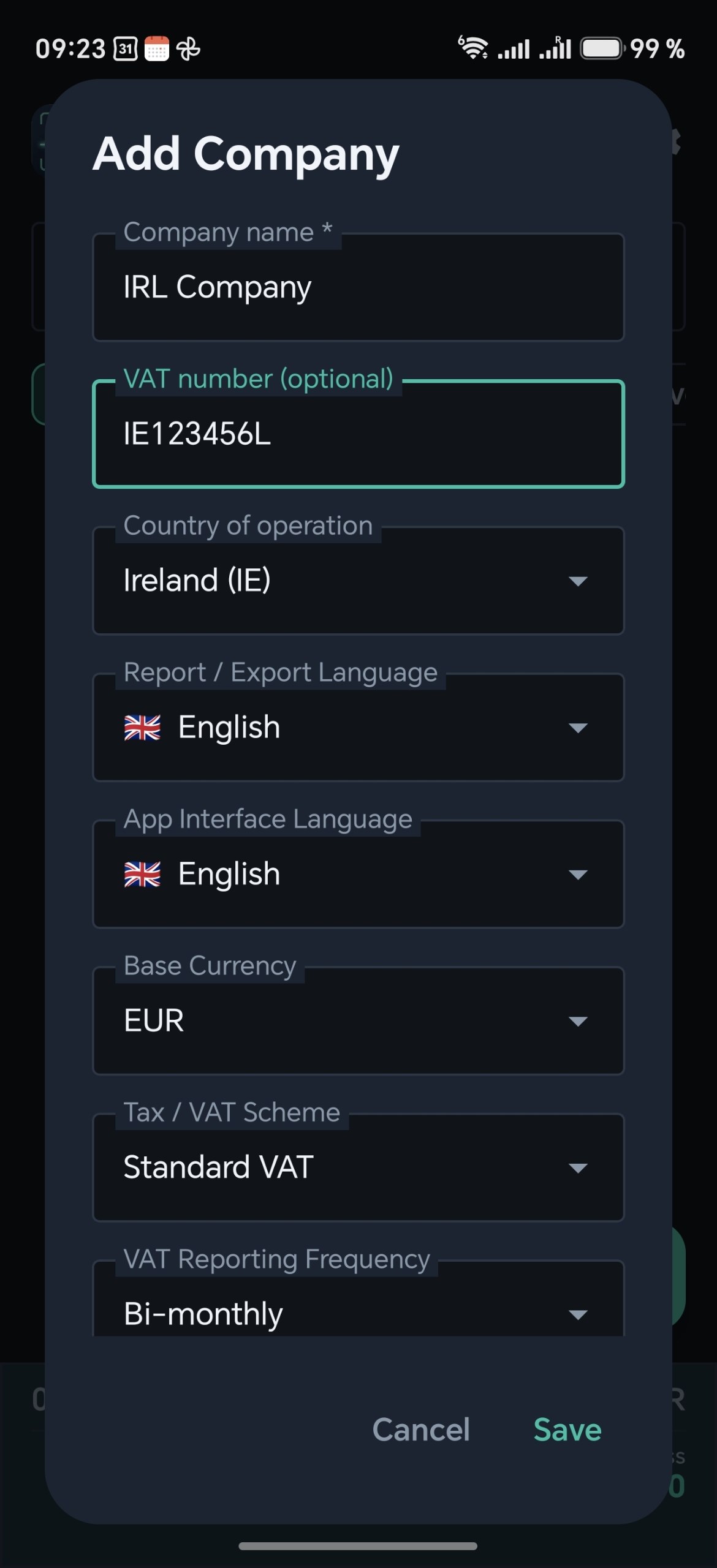
Create a Company Profile

Set your country (any EU member state or UK), VAT status, base currency, UI and report languages.

Invoice Scanner — Add Company screen
2

Snap a Photo or Import a PDF

Use the built-in camera with 1x–4x zoom, pick from gallery, or import a PDF file.

Invoice Scanner — Camera with 1x–4x zoom
3

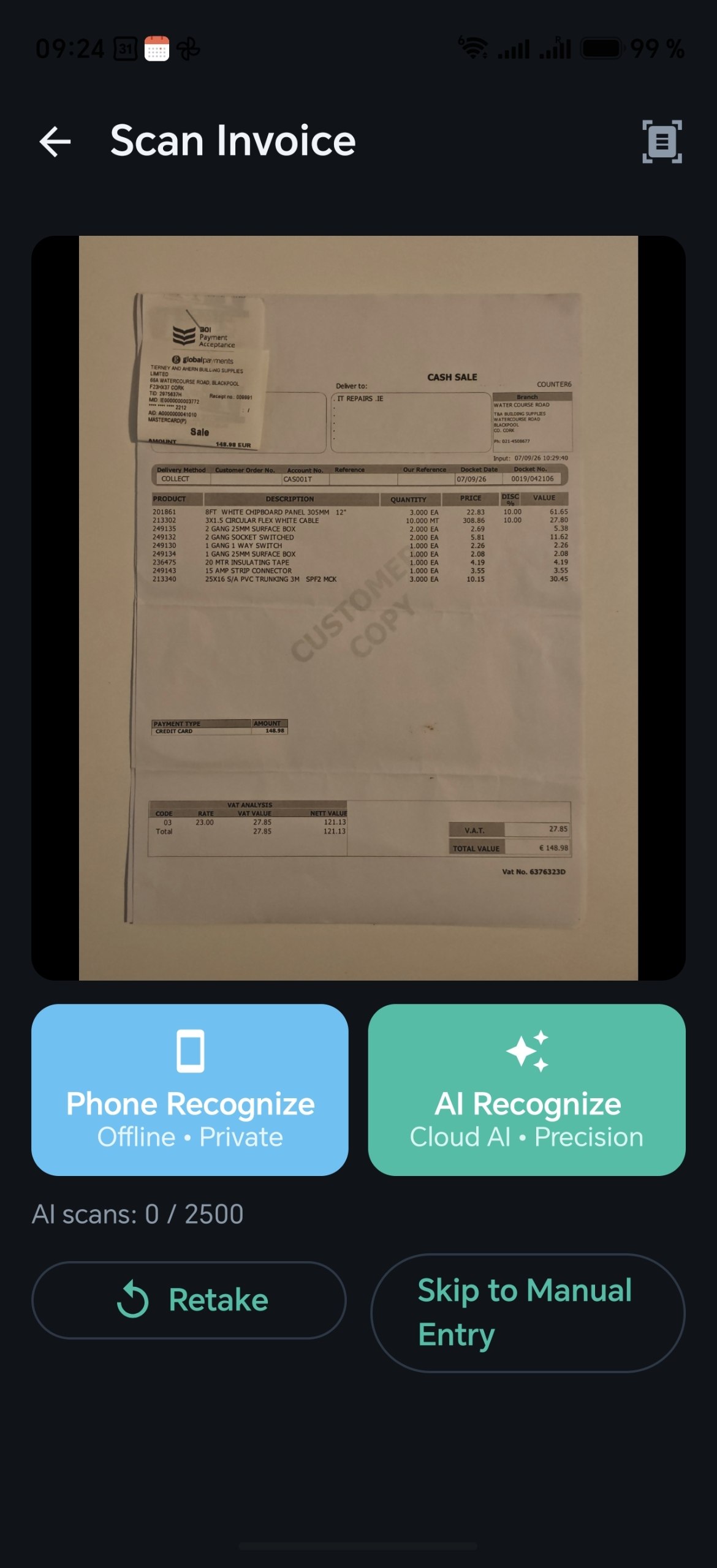
Choose Recognition Mode

Phone OCR (offline, private) for quick scans, or AI Recognize (Cloud AI) for complex multi-line invoices.

Invoice Scanner — Phone OCR vs AI Recognize
4

Verify & Review Data

Check extracted Net / VAT / Gross amounts, supplier details, VAT rate and category. Exclude duplicates before saving.

Invoice Scanner — Verify Invoice screen
5

Export Your Report

One-tap export: XLSX workbook, Standard CSV, Xero / QuickBooks / Sage templates, or a complete Accountant ZIP Pack.

Invoice Scanner — Export options

Simple Pricing

Start free. Upgrade when you need more companies, AI scans or advanced exports.

FREE

€0 For personal use

  • 1 company
  • 30 Phone OCR scans / month
  • 0 AI scans
  • Basic CSV export
  • No XLSX, ZIP Pack, Xero/QB/Sage
  • No Backup & Restore
Get Started Free

CORPORATE

€30 /mo

For agencies & multi-entity teams

  • Up to 10 companies
  • Unlimited Phone OCR
  • 2 500 AI scans / month
  • Full export: XLSX, CSV, Xero, QuickBooks, Sage
  • Accountant ZIP Pack
  • Backup & Restore
Subscribe via Google Play

All subscriptions are billed through Google Play with auto-renewal. Cancel anytime in Google Play → Subscriptions. Prices shown are in EUR; the final price displayed in Google Play may vary slightly by country due to local currency conversion and applicable taxes.

Frequently asked questions

Didn't find an answer? Write to us: drv.developer@gmail.com

Invoice Scanner is built for accountants, bookkeepers and small business owners in the EU and the UK who need to turn paper and PDF purchase invoices into a clean, VAT-ready register — quickly and directly on an Android phone.

Yes. One accountant can manage from 1 up to 10 companies, each completely independent: its own country, VAT status, base currency, tax profile, interface and report languages, invoices and exports. FREE includes 1 company, PRO — up to 3, CORPORATE — up to 10.

Yes. The interface language and the report/export language are set separately for each company — 22 European languages are available for both, covering all 27 EU member states. For example, you can work in English while exporting registers in German for a client in Germany.

The app includes 28 tax profiles — all 27 EU member states plus the UK — with Standard, Reduced, Super-Reduced, Zero and Exempt rates, as well as Reverse Charge. The company's country is chosen per company and defines which VAT rates are offered when you verify an invoice.

You choose the mode for every document. Phone OCR works offline and is ideal for clear, simple invoices. AI Recognize uses a cloud AI model and handles complex, multi-line invoices better. Whatever the mode, every field stays editable on the Verify screen, and the app can calculate VAT from Net or Net from Gross.

All invoices and company data are stored locally on your device. Phone OCR never sends anything out. An image is sent to the AI provider (Google Gemini or Anthropic Claude) only when you explicitly tap AI Recognize — reduced to 1600 px and transferred over an encrypted TLS connection. PRO and CORPORATE also include encrypted Backup & Restore, so you can safely transfer all your data when switching to a new phone.

Yes. In one tap you get an XLSX workbook (Invoice Register, VAT Summary, Category Breakdown, Suppliers), a standard UTF-8 CSV, or an import-ready file for Xero, QuickBooks or Sage — the register is loaded through the platform's standard import, with no manual retyping.

Yes. The Accountant ZIP Pack bundles the CSV and XLSX registers together with all original photos and PDFs in a single archive — convenient for client handover, audits and record keeping.

Invoice Scanner checks every new document for duplicates by invoice number, supplier, date and amount and warns you before saving, so the same invoice never ends up in the register twice.

Subscriptions are purchased and renewed automatically through Google Play. You can cancel at any time in Google Play → Subscriptions; refunds follow the Google Play policy. There is no trial period, but the FREE plan is available without any time limit, without ads and without payment — a good way to explore the app before upgrading (AI recognition is available on paid plans).